

What is Priscale
Priscale is a pricing tool for people who run a service business. It works out what your work actually costs you to deliver, shows you what work like yours sells for from the prices you log and the ones your own accepted estimates add, recommends a price you can defend, and turns that price into an estimate you send to your customer. This page explains the problems Priscale solves and introduces the main building blocks, with links to the guide for each one.
What Priscale helps you solve
Most pricing trouble comes down to three questions that are hard to answer from memory.
What does my work really cost me?
Rent, software, insurance, your vehicle, salaries, your own time: it all adds up, and none of it shows on the invoice. Priscale adds your costs together and turns them into an hourly figure, so you always know the point below which a job loses you money.
What should I charge?
Guessing high loses jobs, guessing low loses money. Priscale combines what a job costs you with what work like yours sells for, using the prices you have recorded yourself, and recommends a range of prices, so the number you quote is a decision rather than a hunch.
Why did I win or lose that job?
Every estimate you send is recorded with how it ended, so over a few months you can see which prices your customers accept and which ones they walk away from.
How the pieces fit together
Each building block feeds the next. You set your costs once, then most of your day-to-day work happens on the right-hand side of this flow.
The building blocks
Burn Rate
Your burn rate is the hourly figure every price has to clear: what you need to earn each hour to cover what running your business costs you, or to reach the income you are aiming for. Priscale builds it from the revenue goal you set, your Expenses, your Employees and the working time behind them. Which of those count depends on the calculation you are on, and your plan decides that rather than you picking it: Side Hustler on Part-Timer, Solopreneur on Freelancer, Growing Business on Business and on every free trial. Priscale then uses the result as the floor under every price it recommends.
This is the one number worth getting right before anything else. See Burn Rate for what each calculation asks you for and how it works.
TIP
If you are new, run through Quick Setup first. It collects your organization details and the numbers behind your burn rate in a few guided steps, so the rest of Priscale has something to work with.
Services and products
Services are the work you sell: a repair, an installation, a design job, a monthly retainer. Products are the physical or packaged items you sell. Both are built the same way and both get priced the same way. The difference comes at the end: estimates are built from services, so use a service when you need to send a customer a quote.
Start with Managing services or Managing products.
Tasks, materials and fees
A service or a product is made of the work and the things that go into it.
- Tasks are the steps you perform, each with the time it takes. Time is what connects the job to your burn rate.
- Materials are what you buy or use up to deliver it, with a quantity and a cost.
- Fees are flat charges on top of the work, like rush delivery, travel or permits. You add these when you build the estimate.
Together, tasks and materials give you the Production Cost: what this particular job costs you to deliver. Anything you save regularly can be stored as a preset and reused, which is what the Tasks, Materials and Fees preset pages are for.
Market Value
Production cost tells you what a job costs you. Market Value tells you what a job like it sells for on the open market, which is the other half of a good price.
You record what you find out about the market as Market Prices, note who you are up against under Competitors, and set a market value on each service or product. Priscale uses the gap between your cost and that market value to recommend prices, along with the situation you are in for this particular job.
See Market prices for where those reference points come from, and the guide on Determining market value for practical ways to find out what your work is worth.
TIP
Market Prices, Competitors and Expenses are part of the Freelancer and Business plans, and Employees is part of the Business plan. Sending an estimate for your customer to review is available on every plan. If a page shows a locked badge, Plans and billing explains what each plan includes and how to change yours.
Estimates
Once a service has a price, you turn it into an Estimate: the document your customer actually sees. On the estimate you adjust what gets charged for, add fees, and watch the estimate total move toward the Target Price you set on the service.
When it looks right, you send it. Recipients get a link to review the estimate and, if you allow it, to approve it. Priscale then records how it ended, so accepted, denied, ghosted and canceled estimates all become history you can learn from.
Start with Managing estimates, then Adjusting an estimate and Sending estimates.
Your Dashboard
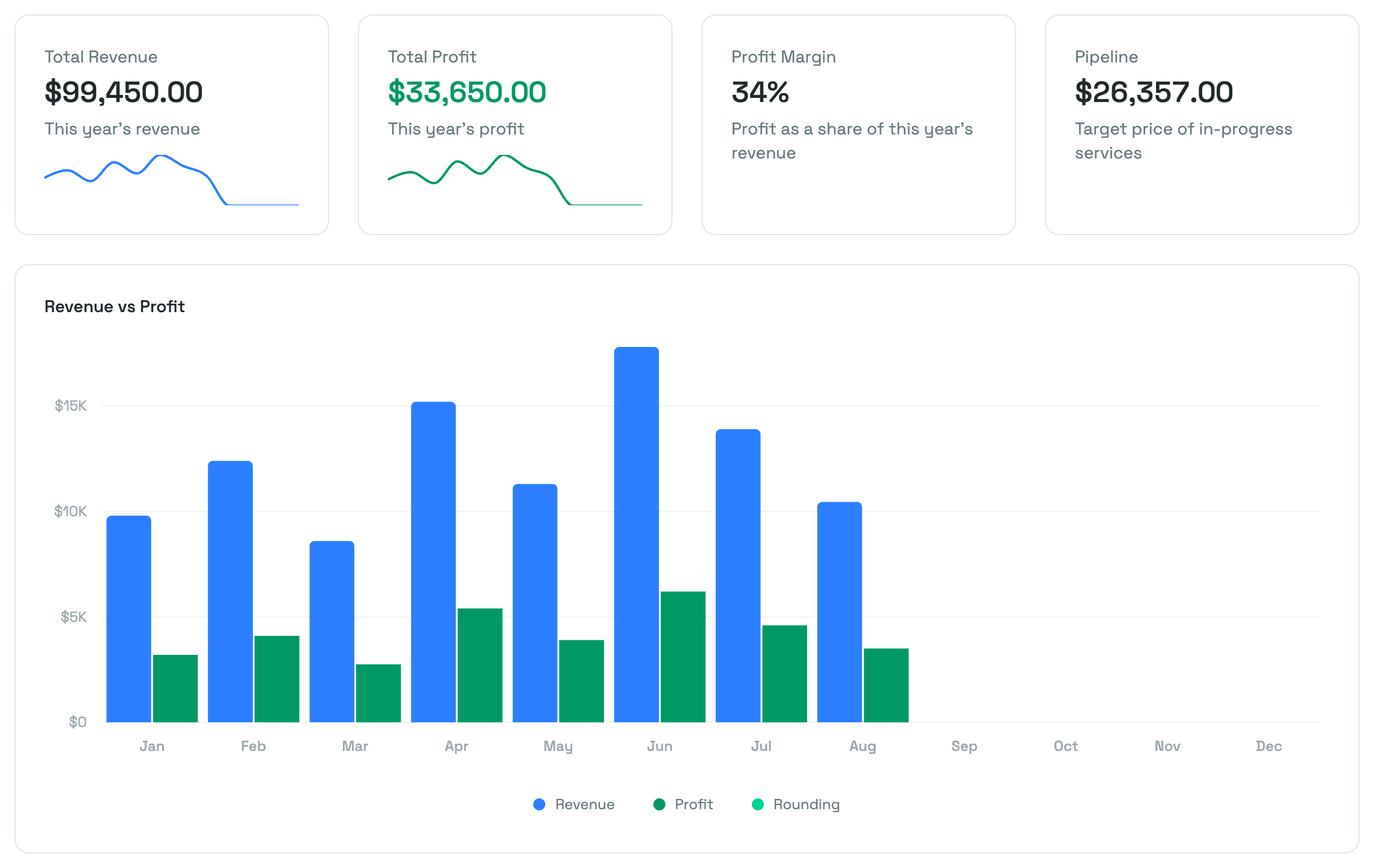
The Dashboard is where all of it comes back to you: revenue and profit for the year, your profit margin, the value of the work still in progress, and how your estimates have been ending month by month. See Dashboard for a tour of each tile and chart.
Where to start
The order that works for most businesses is: set up your organization, record what you spend, get your burn rate right, then build your first service and price it.
How much of that you need depends on how you work. A side hustler can skip straight to creating a service, while a business with staff will want employees and expenses in place first. Workflows by business type lays out the steps for each.
Related pages
- Create your account covers signing up and signing in.
- Quick Setup walks through the guided setup that follows.
- Understanding client budgets helps you find out what a customer can actually pay before you quote.