
The Pricing Spectrum
The Pricing Spectrum is the ladder of possible prices Priscale lays out on the Adjust Price step of every service and every product. It is built from numbers you already gathered: what the work costs you, what the market pays for it, and what your client said they can spend. Every price on the ladder is marked so you can see, before you commit to anything, whether it makes you money or costs you money.
It never picks for you. It shows you the whole range and what each price does to your margin, and leaves the decision where it belongs. This page explains how to read it, on services and products alike. The step-by-step for each flow lives on Pricing a service and Pricing a product.
What the spectrum is built from
| Number | Where it comes from | What it does on the spectrum |
|---|---|---|
| Production Cost | The tasks and materials on the service or product, costed at its burn rate | Your floor: every price is judged profitable or not against this one |
| Market Value | What work like yours actually sells for | Your reality check: the ceiling most buyers will go to |
| Budget | What this client told you they can spend (services only) | The room you have to work in on this particular job |
A service is priced on all three. A product is priced on the first two, because a product is not quoted to one buyer and so has no client budget in the picture.
Each of these has a page of its own: Burn Rate sets what your time costs, Determining market value covers how to arrive at a market value you trust, and Understanding client budgets covers how to get a real number out of a client.
Nothing is built until the service or product has at least one task or material and a market value. Until then the page shows a More information needed notice with shortcuts, Add Tasks / Materials and Set Market Value, straight to whichever step fills the gap.
Your numbers appear at the top of the card as captioned amount buttons, arranged from the lowest amount to the highest, so their left-to-right order depends on your own figures. Pressing one scrolls the ladder below straight to that price.

How the ladder is laid out
The highest price sits at the top and the ladder runs down past your key variables toward zero. Double chevrons above and below tell you there is more in that direction, and fade out when you reach an end.
Prices bunch up tightly around your key variables and spread out in the gaps between them, so the range you actually care about is the range with the most options in it. Your key-variable amounts always appear on the ladder exactly, each with its name on the rung.
Where it opens depends on what you have done so far: on your chosen price if you have one, otherwise on the topmost recommended price if the situation marked any, otherwise on your production cost.
Reading a single price
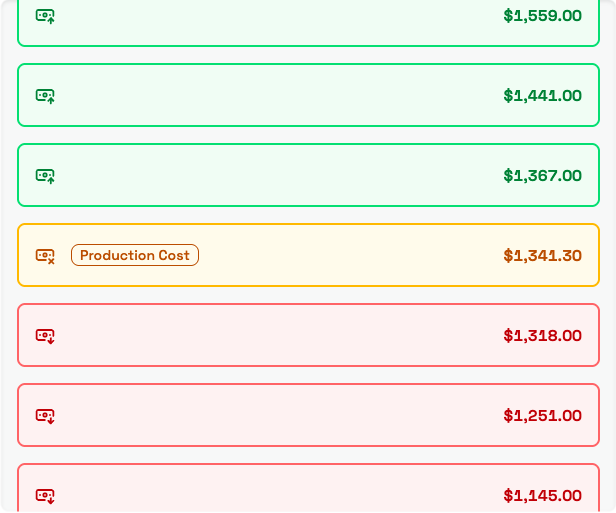
Every rung carries a color and a small icon showing where that price sits relative to your production cost.
| Color and icon | Where the price sits | What it means |
|---|---|---|
| Green, arrow up | Above your production cost | Profitable |
| Amber, crossed note | Exactly at your production cost | Break Even |
| Red, arrow down | Below your production cost | Unprofitable |
Unprofitable means money out of your own pocket, not a thin margin. The words themselves are not printed on the rungs; you get the color and the icon while you browse, and the word spelled out on Result once you pick a price.
Your chosen price is filled in with a deeper shade of its own color, so you can find it at a glance while you scroll.
Warnings on your key variables
Only the named rungs carry warnings, and a warning is never about the price you are looking at. It means two of your numbers disagree with each other, and no price on the ladder can settle that argument for you.
| Warning | What it is telling you | Where to fix it |
|---|---|---|
| Production cost is higher than budget | The work costs more than the client is willing to pay | Renegotiate the budget, or trim what the work takes to deliver |
| Production cost is higher than market value | You are spending more than the work is worth on the market | Trim what the work takes to deliver, or revisit your market value |
| Budget is lower than production cost | You cannot deliver this at the budget you were given | Renegotiate the budget, or reduce the scope |
| Budget is lower than market value | The client is offering less than the work is worth | Negotiate a higher budget |
| Market value is lower than production cost | The work costs more to deliver than people will pay for it | Trim what the work takes to deliver, or check the market value again |
| Market value lower than budget | The client is offering more than most buyers would | Make sure you and the client agree on the scope before you price it |
On a product only the production cost and market value pair can appear, since there is no budget to contradict.
A warning takes the color of the rung it sits on, so you will see them on green rungs too. That is not a mistake: the price is still profitable, and the warning is about your numbers.

WARNING
Read the warnings before you pick anything. They point at a problem upstream of this page, and choosing a price does not make the problem go away.
Recommended prices
On a service, the situation you pick on Your Situation marks a handful of rungs with a purple Recommended tag and shows the advice behind them above the ladder. It changes nothing about your numbers; only the tags move.
A few behaviors are worth knowing, because they look like bugs when you do not expect them:
- A recommended price is always above your production cost. Even the situations that tell you to price low stop above break-even.
- None marks nothing at all. The ladder still works; you simply choose freely.
- Client with large budget marks nothing unless the budget you recorded sits above your market value. Below that there is no gap to aim at.
- The situations that work from the client's budget mark nothing when no budget has been recorded.
- Changing your situation moves the tags, never your chosen price.
Products have no situations, so a product ladder never shows a Recommended tag. Pricing a service lists every situation and what it means.
Picking your price
Press a rung to choose it. Selected Price and Result appear below the ladder, with Result showing what you make or lose at that price and the word for it.

If the price you chose is below your production cost you also get an Unprofitable Price notice. Nothing stops you from choosing it, and sometimes there is a good reason to. The notice is there so it is a deliberate choice.
If the number you want is not on the ladder, select any price first, then press Use Another Price, enter your figure as the Custom Price, and press Set Price. It becomes your price, joins the ladder as its own rung, and is judged like every other one. This is how you round to a number a client reads more easily.
WARNING
Once a service has been completed its price is read-only, and anyone without permission to price the work can see the ladder but not choose on it. Settle the price while the work is still in progress.
When your numbers change
Change a task, a material, the market value, or the budget, and the ladder is rebuilt around the new numbers on its own. Your chosen price does not move, and it stays on the ladder even when it is no longer one of the prices Priscale generated.
That combination is worth watching. Go back and re-read Result after any change, because a price that was comfortably profitable before may be much thinner now.
WARNING
An out-of-date burn rate makes every price on the ladder look better than it is. If your expenses, payroll, or available hours have changed, update your Burn Rate first, then update the service or product, then price it.
Where your price goes next
On the service or product itself, your chosen price shows as the Final Price. On an estimate it becomes the Target Price, the number everything you add to the estimate is measured against.
A service needs a price before you can complete it as accepted or denied. Approving a product logs its price as one of your own market prices, which is the strongest evidence you have of what buyers actually pay.
Related pages
- Pricing a service walks the spectrum through the service flow, including situations and estimates.
- Pricing a product walks it through the product flow, including approval.
- Determining market value helps you set the number the whole ladder is anchored to.
- Understanding client budgets covers how to find out what a client can actually pay.